






Written by
John Shieldsmith14/08/2026

Ecommerce Keyword Research
Get The Print Version
Tired of scrolling? Download a PDF version for easier offline reading and sharing with coworkers.
A link to download the PDF will arrive in your inbox shortly.
Key highlights:
Ecommerce keyword research is the act of using various tools to identify which keywords your business is ranking for, should rank for, and how difficult it will be to rank for them.
Ecommerce keywords can be categorised by intent: informational, navigational, commercial, and transactional.
Ecommerce keywords should appear throughout your site, but only as a primary keyword on a single page, otherwise you risk keyword cannibalisation.
You can determine which keywords to go after by running a site audit, running a competitor analysis, and reviewing whether you’re already close to ranking for any valuable terms.
There are a number of free and paid keyword tools, including Google Keyword Planner, Google Search Console, and ahrefs.
Finding long-term success with ecommerce keyword research
In the age of AI, it’s easy to overlook ecommerce keyword research and the role of organic efforts. Easier still to think keyword research might not be a must at all, now that AI search is all the rage. But did the dawn of the train see horses go the way of the dinosaur? (Not that people rode dinosaurs, as cool as that’d be.)
Even if AI search engine optimisation is getting all the attention, good old-fashioned keyword research still has a place. In fact, 23.56% of ecommerce traffic is organic. On top of this, a carefully-researched keyword strategy is vital to helping your brand show up in the growing number of AI searches and overview, err, views, each month.
With proper ecommerce keyword research, you can practise search engine optimisation (SEO) with your pages, develop a content marketing strategy that meets your audience where they’re at, and ultimately capture the attention of a high intent, driven audience that’s on the hunt for products.
First, let’s take a look at the must-know essentials, then we’ll explore everything from short-tail to long-tail to Peter Cottontail so you can start covering the search engine results page (SERP) with your brand.
Ecommerce keyword research essentials to understand
Ecommerce keyword research is core to any great content strategy. With the right choice of keywords, you can craft content that increases the chances of your content finding the right, high-intent readers at just the right time. (And, you can do fun things like obsess over search trends.)
Learn the following, and you’ll be well on your way to building a killer ecommerce SEO strategy, amassing more links than a fence, and converting readers into customers.
Search intent types.
Search intent is a term used to describe a user’s primary goal, whether that’s high-level knowledge, commercial intent, or hunting for content ideas.
Understanding search intent is huge, as you don’t want to take the wrong approach with your content. If someone’s looking for an informational blog on gardening, a 5,000-word treatise on the ethics of using your competitor’s pest control spray is going to send them into shock.
You can determine search intent by:
Examining existing content that populates the SERPs. If it’s a ton of short blogs, it’s educational. If there are in-depth guides/buyer’s guides, it’s commercial. And so on and so forth.
Looking at the term itself. If a term includes something like “cheap” or “budget,” they’re looking for deals. If it includes “alternatives” they’re likely after a buyer’s guide or product overviews. If it mentions “how” or “why” then they’re after information, etc.
Using SEO tools. There are a number of tools that can help you analyse a keyword, break down content formats ranking for this term, and beyond.
Now, what kinds of search intent are out there?
Informational.
Informational searchers are on the hunt for knowledge and generally not ready to purchase anything.
Oftentimes, informational keywords will surface how-to pieces, guides, tutorial videos, and very high-level pieces. Informational keywords should be paired with equally informative content that doesn’t try to sell, but aims to educate someone and then (usually) pass them further down the funnel.
Navigational.
Ever stop and ask someone where the nearest hot dog stand is? Navigational keywords or search intents are very much the same, often manifesting as a brand name, or brand name paired with a page.
For example, “BigCommerce support” or “BigCommerce login” or “BigCorndogs help” (which would be a typo, or someone getting attacked by giant food).
Navigational terms usually come from users who are on a mission to find a particular page, so it’s important the pairing page align with that term.
Commercial.
Anyone with commercial intent knows what their problem is, and now they’re on the hunt for a solution. These searchers are driven and motivated, and usually need a buying guide, comparison pieces, and so on.
Many times, but not always, commercial intent keywords have “compare” or “best” or “review” in the term.
Transactional.
Transactional intent keywords are all about the purchase. These searchers have done the learning, they’ve asked where the nearest bathroom is, compared their options, and now they’re ready to buy.
Transactional keywords include things like buy, order, discount, sale, purchase, subscribe, and so on. Again, anything you’d commonly associate with a product page, or anything leading right up to the checkout.
It should come as little surprise that transactional keywords are best paired with product pages.
Search volume.
Search volume refers to the average monthly searches for a particular keyword search word or phrase.
Search volume can fluctuate wildly, depending on the keyword, your niche, the intent, lunar cycle, and so on. In many cases, higher search volumes can be a great thing to focus on, especially if you’re prioritising awareness or education.
BUT, search volume isn’t everything. Commercial or transactional keywords, for instance, will often have lower volumes but yield more of a return than a high-volume, generic term.
In general, the further along in the nurturing process, the lower the search volume. (But not always, because in the world of SEO, nothing is ever certain.)
Keyword difficulty.
Keyword difficulty (KD) is a measure of how hard it is to rank for a term. Depending on the SEO tool you use, whether it’s Ahrefs or Semrush or something else, the KD metrics will vary. Where one tool might say a term is relatively easy, another might say, “Whoa, buddy. Slow down.”
Regardless of the tool, the higher a KD, the harder it is to rank. You should dream big and aim high, especially if you’re looking at a term you absolutely must have. But, you also want to focus on some easier, low-hanging fruit, otherwise your SEO strategy will starve.
Long-tail vs. short-tail keywords.
Keyword length falls into two categories: long-tail and short-tail keywords.
Long-tail keywords contain three or more words, sometimes even being phrased as a sentence or entire question. In many cases, long-tail keywords have less search volume than a short-tail keyword, but they can make up for this by targeting those further along on their product journey.
Short-tail keywords are on the opposite end of the spectrum, with search queries that can contain one to two words. Unlike their longer counterparts, short-tail keywords frequently target those who are in the early stages of their product discovery adventure.
Product page vs. category page vs. blog page.
While keyword research can encompass all manner of things, efforts are typically funneled into a few types of pages: product, category, and blogs.
It’s important to understand the different types of pages, as each of them fits differently within your overall content strategy.
Product pages.
Product pages are all about conversion rates, with a combination of product keywords and transactional keywords, along with copy that highlights features and solutions to customer pain points.
Keep in mind user intent for these pages is often commercial or transactional, so you’ll really want to lean in on language that speaks to this.
Category pages.
Where a product page is focused on specific product titles and transactional language, category pages are one level removed. These pages will still have some brand-related keywords, but you’ll also find more generic terms.
For example, where a product page would have, “BigCommerce Burgers Rule T-Shirt,” a category page would have, “T-shirts” or “Hoodies” or “Mugs.”
Blog posts.
Blog posts are not only a key part of any keyword strategy and content marketing effort, but also prime real estate for on-page SEO fun and backlink building.
Where product and category pages come with authority and drive purchases, blog posts let you educate readers, target tangential search terms, and ultimately cast a wider net.
For example, say you have a category page targeting coffee mugs, brimming with product pages for your various mugs. Your blog posts could then target things like “Best coffee mugs for new grads” or “Best coffees for your new mug” or “Coffee mug repair tips.”
No matter what you do, always keep your audience in mind and make sure everything fits your brand messaging and style. With every keyword you target, always think about the intent behind the term as well. “How to fix a coffee mug” should be paired with a blog that matches, not a sales piece, and so on.
How to do ecommerce keyword research
Keyword research is a lot like making a great chilli: ask ten people how to do it, and you’ll get ten different recipes. And most of those recipes will be the same, except for one that suggests something heinous like adding mango juice.
At the end of the day, every keyword research approach boils down to some combination of the following:
Step 1: Audit the keywords you already rank for.
First, it’s important to know what you’re already ranking for, as this can help you identify quick wins (Optimisations that push you up to the top 10 for that term), help you avoid writing content that competes with your own ranking pages, and more.
There are a number of ways you can go about checking existing keyword rankings:
Google Search Console: Easily the most well-known analytics tool, Google Search Console offers a free way to monitor rankings via the “Average Position” listing in your Performance section.
Paid SEO tools: There are countless paid SEO tools that can offer everything from basic rankings to in-depth analytics and beyond. Ahrefs, Semrush, Moz, and others.
Whether you intend on getting a paid SEO tool or not, setting up Google Search Console is a great idea. You’ll want the information it provides for the long haul, and it’ll always be there in the event you cancel a paid tool down the road.
Step 2: Build seed keywords and expand them.
Seed keywords are high-level, borderline generic terms that apply directly to your business. These terms generally have a high search volume, but also a high difficulty. But, they’re still worth targeting, and using as jumping off points for longer-tail keywords.
For example, continuing with the idea that you’re a premier coffee mug company, terms like “coffee mugs,” “imprinted mugs,” “custom mugs,” and so on would all be seed terms to begin with.
From there, you could look for long-tail terms, like “custom mugs for cheap” or “college logo imprinted mugs” and so on.
Step 3: Analyse competitors and run a gap analysis.
Your business competitors are also your keyword competitors, which is where a competitor analysis comes in.
The easiest way to scope out the competition and run a gap analysis is with a paid tool. With various tools you can easily plug in your domain and those of your competitors, and quickly see who ranks for what, and where you fit in.
If you’re operating without any paid tools, you can still run a competitor analysis to a degree. Instead of using a tool, you’ll want to:
Run a Google search of a target keyword and take note of competitors that are ranking for it.
Take note of the content types ranking for a term as well. Is it a blog? Dense guide? Infographic? Smell-o-vision?
Run a repeat search of a keyword, but let autocomplete fill in the rest for further inspiration. For example, typing “Coffee mugs” has multiple autocomplete options, like “coffee mugs for dad” or “coffee mugs with lids.”
Lastly, you can register for a Google Ads account (If you don’t already have one). From there, start a campaign and use the keyword planning tool to analyse a competitor’s URL instead of your own. Google will then let you know which terms it thinks that brand should go for, in turn letting you know what you should target.
Pretty clever, eh? (Note: The author did not think of this strategy on his own.)
Step 4: Prioritise by brand match, intent, volume, and difficulty.
Depending on your niche, you can easily wind up with dozens or hundreds of potential keywords. You can’t target them all. Not right away, at least. You need to prioritise them.
You’ll want a mix of keywords, but in general you can prioritise them by examining them through these lenses:
Business match: Is the keyword relevant to your business, goals, or campaigns? If not, throw it to the bottom of the pile and evaluate it at a later date. Keywords, first and foremost, have to make sense for your goals or brand.
Intent: Your strategy needs a mixture of keywords by intent. You’ll always want informational keywords, but you’ll also need those that play into commercial and transactional intent. Ultimately, the intent behind a keyword HAS to match what the matching page is aiming to accomplish.
Volume: Search volume isn’t everything, but it’s also something. Your business needs traffic, so you’ll want some terms with high volume. But, don’t let smaller search volumes keep you from targeting those powerful long-tail terms.
Difficulty: As mentioned earlier, it’s good to aim high. But, you also need to be realistic about what you can rank for. If your business is newer and doesn’t have many backlinks, focus on more attainable keywords while building links and relevance that will help you capture the difficult ones later.
The further you get into keyword research and SEO, you’ll hear a lot of words like “it depends” or “sometimes” or “maybe.” In other words: nothing is ever certain.
Take all of the above into consideration as you build your keyword plan, but don’t be afraid to experiment and take risks. Target those difficult words early on anyway and build links to that page, celebrate the little victories, and don’t ever treat any page as “done.”
Advanced keyword research tactics
If you really want to earn your keyword stripes, there are some advanced research tactics you can make a mess with.
Just keep in mind the aforementioned steps are foundational, whereas the following tactics are something to work toward. Like busting a sweet wheelie after ditching your training wheels. (Similarly, expect to fall down here and there.)
The keyword golden ratio.
The keyword golden ratio (KGR) is a metrics-driven way to determine and find underutilised keywords that you have a solid chance to rank for.
You can find the KGR by:
Find a keyword with a search volume of 250 or less.
Run a custom Google search using the “allintitle” modifier so only ranking pieces with the keyword in the title appear.
Divide the total number of results from your “allintitle” search by the keyword’s search volume.
The end result is your KGR, with lower values being easier, and anything greater than 1.0 being highly difficult.
The KGR isn’t a magical cure-all that guarantees success, but many swear by it, especially if your site is newer. If it works for you, great, BUT don’t let this be your only approach. Many larger or much smaller terms can have value as well.
“People also...”
Whenever you Google something, there’s a “People also search for” section that can appear further down the page. There’s also often a “People also ask” that shows up for certain terms. Both are a veritable treasure trove of keyword ideas.
Check the “People also search for” section to find potential related keywords, oftentimes those that fit the long-tail category. Explore these and see if they make sense for you to either target individually, or at the very least if they have a place within a larger piece targeting a broader term.
“People also ask” is even more useful, as it can provide you with verbatim long-tail terms to go after. Search your target term and check the “People also ask” to either find long-tail variants that you have a better chance of ranking for, or add them to the bottom of a piece under an FAQ section if they don’t warrant an entire piece.
Content clusters.
While in the midst of keyword research, you’ll come across terms that are big. Real big. Think about your own category pages and then the products that fall underneath. In the keyword world, content or topic clusters are like the category page to products, or smaller keywords that go underneath.
Think about your current goals and initiatives. Identify a large term and jot it down. Then, run through “People also” queries, brainstorm, and so on, and identify related keywords that fall underneath but still warrant an entire blog or page. Ta-da! You made a content cluster.
Going back to our dead horse of an example, you could have an entire content cluster for your customisable mugs. Within that, you could have “customisable coffee mugs” as your primary term, and then supporting pieces linking back to it that each cover topics like, “custom coffee mugs for holidays” or “custom mugs with lids” or “X ideas for custom holiday mugs.”
Where to place keywords on your ecommerce site
Finding the right keyword is only step one (Disregard that the previous section was in fact, four steps and a bonus.) Once you’ve identified a handful of keywords, you need to know where to stick ’em.
For all of the following areas, also be mindful of keyword cannibalisation — the act of targeting the same term with multiple pages, causing them to compete with one another.
Product titles and descriptions.
Both product titles and descriptions are important to keyword success. While you shouldn’t totally alter the title of a product to fit a keyword, you should absolutely fit a keyword into a product title where it makes sense.
For example, “Ocean blue coffee mug” might be a product you carry. Upon further keyword research you realise “reflective coffee mug” is actually a valuable term, and as luck would have it your mug IS pretty shiny. And thus, “Ocean blue reflective coffee mug” was born.
Product descriptions offer a little more in the way of wiggle room, as you can include valuable, relevant keywords in the description without having to worry about a product rebrand. Is that mug durable? Is “durable coffee mug” packing some volume? You know what to do.
Category and collection pages.
Product categories and collections are essentially content clusters or topic clusters just waiting to get optimised.
Go through your various categories or product collections and either return to your keyword research or begin anew. From there, identify commercial terms that apply to the category, but still have search volume.
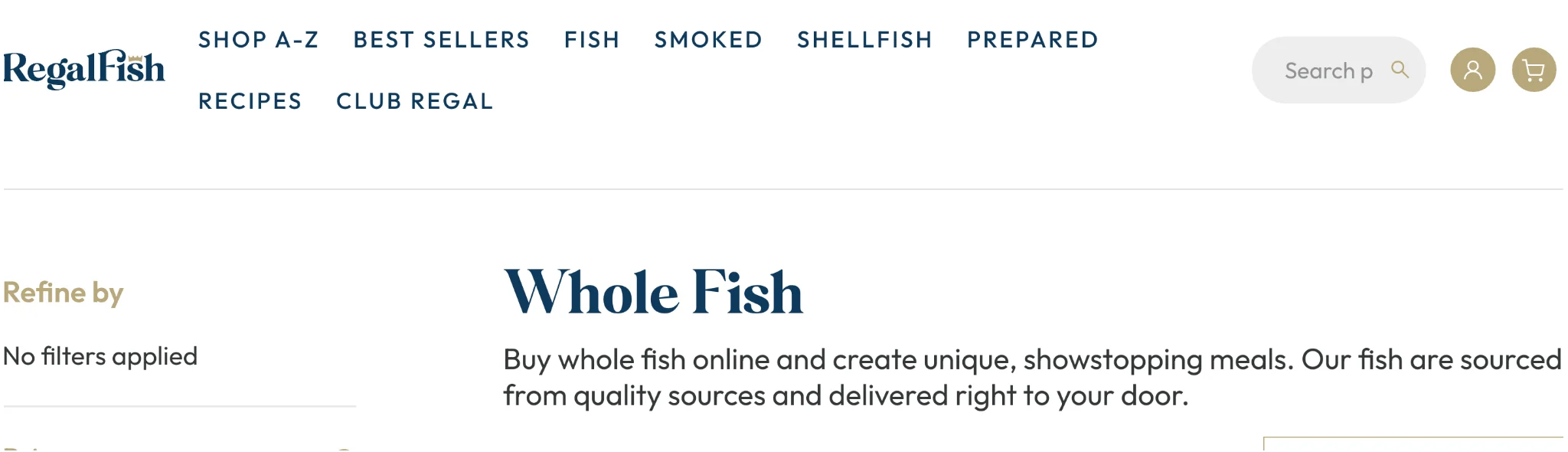
Instead of blathering on about coffee mugs, take the below example from Regal Fish. Notice how the category copy at the top mentions “Buy whole fish online,” and then uses terms like “quality sources” that fish shoppers are surely concerned with.
URLs, title tags, and meta descriptions.
Any page, whether it’s a product page, blog, etc., should have a target keyword throughout. This includes placing the keyword in the URL, title tags, and meta description.
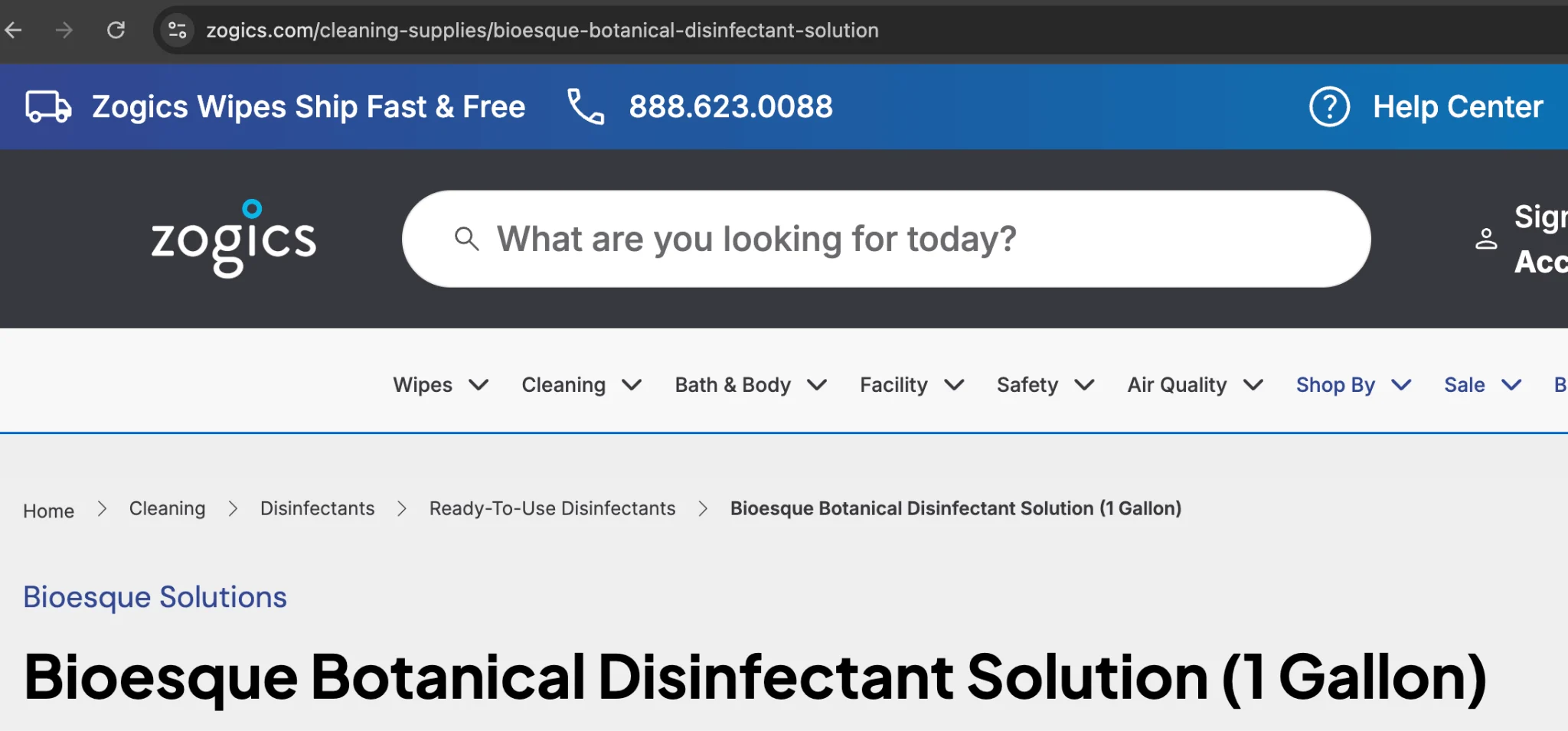
Take Zogics, for example. The below product page is a great example of this in practice, as the URL contains “botanical-disinfectant-solution,” as does the product title and description.
This is also why it’s important to have a platform that lets you easily edit these various SEO elements. For instance, BigCommerce has numerous built-in SEO controls that let you edit everything from the meta descriptions to URLs to title tags.
Blog content and internal links.
Blogs are like a garden, in which you can plant keywords throughout. Like a garden, you also don’t want to overstuff the thing (I think. I know nothing of gardening.)
Within any blog post, you can include the primary keyword here and there throughout, but take care not to keyword stuff.
You’ll also want to include keywords to other pieces you’ve created within internal links to those pieces. (It’s also important to link to other posts, so as to avoid orphan pages.)
For instance, when writing about ecommerce technical SEO, you could link to a piece on technical SEO. See, just like that.
Ecommerce keyword research tools
Legend has it, for every keyword ranking on Google, there are two SEO tools. Okay, so there aren’t THAT many, but there’s no shortage of ecommerce keyword research tools available.
To help you sift through the deluge of research tools available, we’ve broken them down by free and paid, including only those that are trusted, well-known, and a safer long-term bet.
Free keyword research tools.
There are a number of free keyword research tools, many suited for various tasks. The following are both trusted and useful, each with a different purpose. (So, feel free to use them all to some degree.)
Google Keyword Planner.
Google Keyword Planner is built with ad campaigns in mind, allowing you to create campaigns and receive keyword suggestions, research trends, estimate ad costs, and ultimately build out a plan.
There will come a time when you want to incorporate Google ads into the mix (If you’re not already), so all of this information is useful for its intended purposes, too. That being said, everything Google Keyword Planner tells you is still valuable for keyword research and SEO purposes.
Don’t forget: As touched on earlier, you can plug in a competitor’s URL when using this tool and receive suggestions for their brand, essentially turning this into a free competitor analysis/gap analysis tool.
Price: Free.
Ideal for: Those just starting out with keyword research/SEO, businesses with budget constrains, and those also focusing on ads.
Google Search Console.
Google Search Console is essentially royalty in the keyword and SEO space. While Google Search Console is more beneficial for those wanting to check performance and identify trends, it does have its uses for keyword research.
Within your Google Search Console reports, you can identify which of your pages are driving the most traffic, and which queries (keywords) are getting the most clicks. Both of which can be useful for further research.
For example, once you’ve pulled several of your top-performing queries, you can punch these into another keyword tool to explore additional long-tail variants, OR you can just run them through Google and find “People also” results to mine for more content.
Worth noting that Google Search Console can be intimidating at first. There are a ton of options, the terminology isn’t always clear, and it’s pure information overload. Take your time and don’t hesitate to watch some tutorials.
Price: Free.
Ideal for: Every ecommerce business should have Google Search Console in their repertoire.
Google Trends.
Google makes the list again with Google Trends. This tool is about as straightforward as it gets, letting you punch in a keyword and see how it’s trending.
Once you’ve searched a keyword, you can even see variations of that term and how much they’re trending up or down. This is great for finding additional variations of a term to include in a page or article, or for identifying long-tail terms that might work better further along in the customer journey.
Google Trends pairs nicely with Search Console, as you can pull those top-performing queries and then punch them into Trends to find keyword variations that might make for great related content.
Price: Free.
Ideal for: Keyword research and SEO newcomers, and those operating with a smaller budget/limited access to more advanced tools.
Answer the Public.
Answer the Public is similar to trends, in that it will help you identify keyword variations. Unlike Google Trends, Answer the Public offers an even more granular approach, breaking down keywords by search engine, AI model, and beyond.
What makes Answer the Public especially useful is how much information it provides at a glance. After searching a single term you can quickly see related questions, comparison-driven terms, and even preposition-related terms.
Price: One free search each day, three if you make an account.
Ideal for: Those wanting a slightly more advanced experience than Google Trends, and those with limited budgets.
Paid SEO suites.
For those wanting a more advanced experience, there are a number of paid SEO suites that can do everything from basic keyword research to AI-assisted keyword exploration.
Semrush.
Semrush offers a comprehensive suite of tools that enable anyone with a baseline level of SEO knowledge to handle nearly every aspect of keyword research and content planning.
Some of the major features offered by Semrush include:
Keyword Magic Tool: A powerful keyword research tool that pulls search volume, difficulty, trends, and more.
Keyword Gap: A quick and easy gap analysis tool that allows you to see your complete rankings against those of a competitor.
AI Search Tracking: Overall performance for your brand within various AI engines, letting you know how your AI optimisation is working.
While Semrush is incredibly powerful, it’s worth noting that it’s not cheap, nor is a complete SEO newcomer going to get their money’s worth out of it. But, if you have patience and time to learn, and the funds, it’s worth exploring.
Price: $139.95/month and up.
Ideal for: Those wanting advanced keyword research tools and more comprehensive SEO functionality.
Ahrefs.
Ahrefs focuses more on keyword research and organic SEO, as opposed to Semrush’s approach of “everything but the kitchen sink.” As a result, ahrefs is often considered more approachable, and it’s more affordable.
This isn’t to say ahrefs is limited, as it still offers a lot, including:
Keyword Explorer: Search volume, difficulty, trends, and more.
Content Explorer: A powerful tool that makes it easy to get new content, PR, or link-building ideas on any topic.
Brand Radar: In-depth analytics on your brand’s overall ownership of a certain keyword or topic.
If you’re more focused on keywords and not wanting the many bells and whistles of Semrush, ahrefs offers a clean, fast, affordable way to go beyond the basics of the free tools listed.
Price: $129/month and up.
Ideal for: Those wanting more advanced keyword research tools and ranking tracking than Google tools allow.
Moz.
Moz, known for providing great content on SEO and keyword research, also offers one heck of a keyword research and SEO tool. Where ahrefs offers a more focused and trimmed down version than semrush, Moz offers an even more budget-friendly and streamlined experience.
Once again, this doesn’t mean Moz isn’t capable either, with features like:
Domain Authority tracking: Easily monitor your site’s overall authority, or strength, which helps you gauge how easily you can rank for more difficult terms.
Keyword Explorer: Goes beyond basic keyword research, offering AI-powered insights and keyword grouping suggestions for mapping out entire content plans.
Link Explorer: In-depth link analytics, total backlink count, suggestions around anchor text, competitor backlink profiles, and more.
Moz may not have the breadth of a platform like Semrush, but the platform is excellent for those especially concerned around their backlinks. As your site grows and your keyword ambitions with it, domain authority will only become more important.
Price: $99/month and up.
Ideal for: Businesses focusing on backlinks, link building, and their overall domain authority.
Marketplace and niche tools.
Most keyword tools focus on search engines and overall site performance. If you’re concerned more with marketplace performance, like how you’re doing on Amazon or Walmart, you need something else.
The following tools aren’t ideal for traditional keyword research, but bring something especially unique to the table.
Helium 10.
Helium 10 is an analytics and research tool built with marketplaces and social channels in mind.
With Helium 10, you can easily check your performance on marketplaces with features that include:
Black Box: A tool for researching product ideas that fit into the sweet spot between high-value and low-competition.
Scribbles: A product description analytics tool that provides keyword volume insights, while also helping you optimise your listings.
Cerebro: A tool for looking up competing Amazon products by ASIN, revealing which terms are driving the most traffic to that product listing.
If you’re only selling on your site and not yet embracing the omnichannel model, Helium 10 isn’t the best choice. But, for those operating across various marketplaces, Helium 10 is a useful tool to keep handy.
Price: $129/month and up.
Ideal for: Ecommerce businesses with a presence in one or more marketplaces, looking to stay competitive.
Keywords Everywhere.
Keywords Everywhere is a browser extension that provides instant keyword and SEO information, wherever you happen to be browsing. (Almost like the name was chosen with that in mind.)
Keywords Everywhere is incredibly streamlined, offering in-browser access to:
Search volume, cost-per-click, and competitor advertising scores.
Historical trends for a particular term, going back as far as 2004.
Analytics even when browsing ecommerce content on Amazon, YouTube, Etsy, or eBay.
Worth calling out the access to information Keywords Everywhere provides, as it works across Google, YouTube, ChatGPT, Amazon, and countless other marketplaces and platforms.
Price: $7/month and up.
Ideal for: Smaller or less-experienced SEO teams looking for keyword information, or those wanting quick access to the basics right inside their browser.
AI-assisted keyword research.
AI, so hot right now. Being the case, there are countless AI-assisted keyword research tools you can use.
Keep in mind, these are all powered by AI, so your results may vary and everything should be carefully vetted. (Ideally within one of the trusted tools already mentioned above.)
ChatGPT: ChatGPT doesn’t have access to real-time search data, but it can be useful for noodling on a topic you throw at it, providing you with questions and long-tail variants.
Gemini: Gemini can provide topic suggestions and help you vet ideas, all based on real-time Google data, but struggles with the large datasets Claude can juggle.
Claude: Claude isn’t the fastest tool in the West, but it will gladly process giant keyword datasets and spit out intent clusters and content clusters.
Again, none of the above should replace your human-driven efforts and the information provided by any of the aforementioned tools in this article. But, if you’ve hit an absolute wall and you can’t think of any ideas, the above AI tools can lend a hand.
How keyword research works for AI search (AEO and GEO)
The days of SEO aren’t over, but the domination of traditional search is dwindling; 37% of people use AI to start their online journeys, rather than traditional search engines.
While a lot of the research process itself still applies to the AI space, which encompasses answer engine optimisation (AEO) and generative engine optimisation (GEO), ranking in the SERPs and appearing in AI responses requires a multi-faceted approach.
How AI search changes keyword behaviour.
Keywords in the SEO space are generally to the point. Even long-tail terms aren’t THAT long most of the time. AI queries, on the other hand, can be entire sentences, questions, or beyond.
Think about how someone interacts with an AI tool versus Google. On Google, you’re more likely to search for a keyword or short string. With AI, you can have an entire conversation before results are surfaced. Instead of a straightforward keyword, there are numerous pieces of context sandwiching it on the other side.
How AI is changing keyword research.
Because of how differently people use AI when compared to a search engine, keyword research for AEO and GEO purposes has changed, too.
Instead of focusing in on a single keyword, long-tail or otherwise, research for AEO/GEO requires looking at:
User intent: Much like search, it’s important to understand someone’s intent behind their query to an AI tool.
Themes: AI works by clustering information, so getting surfaced by AI means understanding what kind of content surrounds a particular query.
Semantics: Unlike SEO, where exact keywords are a must, performing well in AI relies more on general semantics.
Think about a conversation you’d have with someone about a particular product or topic. Both AEO and GEO require a similar thought process, with more emphasis on “why” someone is looking for something, not exact keyword phrasing.
Optimising for questions and conversational queries.
One of the biggest shifts with AEO/GEO is that your content has to be optimised for questions and conversational queries, not direct keyword matches.
For keyword research itself, this means you can put even more stock into long-tail and “People also ask” type findings. While the exact phrasing someone uses in an AI tool might differ from the verbiage you find during research, context and semantics are more important and will see you through.
Structuring content so AI engines cite you.
AI and search engines are looking for slightly different things, but the good news is that you can still optimise for both at the same time.
In general, you can improve your chances of AI engines citing you by:
Include question-formatted sections within your articles, both as headers and in an FAQ area.
Underneath questions, provide succinct answers that speak to the question.
Provide receipts, including stats and reputable sources whenever you make any assertion.
Ensure that every section of a page or article works on its own, as this makes it more likely an AI engine will interpret it properly and then cite it.
Again, you can accomplish all of the above while also optimising for traditional SEO. Keep the above in mind, put quality above all else, and the rankings and citations shall come.
The final word
Ecommerce keyword research is a lot like a hot dog eating contest: easy to take on, and easy to feel like something you maybe shouldn’t have agreed to.
Unlike a hot dog eating contest, ecommerce keyword research is easy to tackle and digest in small chunks. Take your time and come up with a game plan:
Export your current rankings from Google search console.
Build a seed-keyword list to use for a competitor gap analysis. (For free with Keyword Planner!)
Map each of these keywords to a product, category, or blog page.
Over time, you’ll realise which types of content and keywords resonate with your audience. You’ll also learn your way around your preferred keyword tools, making this all faster, easier, and more effective.
The right ecommerce platform can also make your life easier. For example, BigCommerce lets you easily customise URL structures, alter metadata to include keywords, and quickly stand up new content.
See for yourself and explore the platform further.
CTA A7: Explore Platform
FAQs about ecommerce keyword research
Unlike traditional SEO keyword research, ecommerce keyword research focuses on product-driven terms and commercial intent, with the ultimate goal of increasing sales.
As AI research tools have shown, they can handle data and information at a rate and speed with which the average human is unlikely to compete. Machine learning and artificial intelligence (AI) can accelerate and automate keyword research, allowing businesses to track more information quickly and easily.
As this technology continues to grow, automated processes will only continue to grow in complexity and clarity, giving businesses the ability to track real-time keyword metrics at the push of the button while giving their team members more time to uncover the ramifications of those numbers.
A product or category page should target one primary keyword, with anywhere from two to five secondary terms.
YouTube keyword research is a subsect of video keyword research, which involves the process of finding the search terms people use to search for video content on YouTube.
By finding relevant keywords, you can create videos and optimize titles, descriptions, tags and content to craft exactly what people are looking for.
Similarly, TikTok keyword research — also known as TikTok SEO — is the process of optimizing content to ensure that TikTok users can easily find it through the platform’s search engine.
Because TikTok’s feed is so determined by the user’s interests, TikTok keyword research involves an in-depth focus on relevant and high-volume keywords to find these users and make it onto their front page.
If you notice a severe dip in your site performance, especially where rankings or clicks are concerned, you should perform an audit as soon as possible and identify the culprit.
You can start keyword research with free tools like Google Keyword Planner and Google Search Console, instead of using paid tools.
If you have the budget and the experience to fully utilise paid SEO tools, you should look into incorporating them when you can. Keep in mind many SEO tools are more of a suite and their functionality will likely overlap with others.
YouTube and TikTok keyword research are similar to traditional keyword research, and important to expanding your ecommerce brand into these popular social platforms.
Both YouTube and TikTok keyword research require identifying popular search terms, hashtags, and more. By performing this type of research, you can determine user intent for various pieces of social content, play into social commerce, and secure free traffic.