- Start & Build

Product Overview
What you can do with BigCommerce.
Agentic Commerce
 AI-powered solutions for growth.
Design Your Store
Build your store with or without code.
Apps & Integrations
Over 1,200 apps to help you grow.
Migrate to BigCommerce
Switch from Shopify, Woocommerce, Salesforce, Magento, and more.
- Launch Services
Overview
Chart your path to success with specialised services.Implementation Project Management
Experts to ensure you launch on time and under budget.Solution Architecture
Seasoned advisors to help you best design your store.Data Migration & Optimisation
Expertise on a clean and clear path to migrating your data.Enterprise Launch Package
Personal training on how to set up and launch your BigCommerce Store.

Professional Services Blog Series
Get to know our teams and how they support your success in this Q&A series.

The Global B2B Buyer Behavior Report
This in-depth report provides actionable strategies to help you sell more online.
Regional Infrastructure Migration and Why It Matters for Ecommerce Performance

Create your store and start selling today.
Create your new website.
See if the BigCommerce platform is a good fit for your business.
No credit card required.

Written by
Joe Cai27/05/2026
Key highlights:
Regional infrastructure migration moves your store instance to a data centre that’s closer to your customers to reduce latency and improve performance.
It can reduce latency by 200–300 milliseconds per request, a meaningful gain compared to typical optimisations.
Regional infrastructure supports both performance and data residency requirements as businesses operate across different markets.
That latency affects the entire customer experience, from page loads to interactions.
Introduction
When we talk about ecommerce performance, most people think about frontend optimisation. Things like images, page structure, or how fast a page renders.
Those things matter. But there’s another factor that has a direct impact on how your storefront feels: where your backend infrastructure is running.
Here, “location” means the data centre where your store instance is hosted.
Every interaction on your storefront depends on requests going back to that backend. The distance those requests travel affects how quickly your site responds.
If your customers are in Australia and your infrastructure is in the US, there’s an ocean between them and your data. That distance can introduce 200 to 300 milliseconds of latency per request.
Regional infrastructure migration is how we address that. It allows us to run your store instance in a region that’s closer to your customers while keeping everything else the same.
What is regional infrastructure migration?
From one region to multiple data centres.
Several years ago, most BigCommerce infrastructure was located in the US. As the platform expanded, we added data centres in other regions, including Europe and Australia.
This determines where your store instance runs within BigCommerce.
Moving store instances between regions.
Regional infrastructure migration is the process of relocating a store instance from one region to another.
It’s a way to align the backend location with where customers are. The store instance, storefront, APIs, and integrations remain the same.
At a high level, the only change is which data centre the store runs in.
Why infrastructure location directly impacts ecommerce performance
Every interaction depends on backend requests.
Each action on a storefront triggers a request to the backend.
That includes loading a product page, running a search, selecting a variant, adding an item to the cart, or updating quantities.
Each of these requires a round trip to the data centre.
Distance adds latency.
If the backend is nearby, those requests complete quickly. If it’s far away, each request takes longer.
When requests cross long distances, like between continents, that delay becomes measurable. That’s where the 200 to 300 millisecond difference comes from.
It’s also important to realise that delays accumulate across a session. A single request delay is small on its own. Across a browsing session, those delays stack up.
That affects how quickly pages respond, how smooth interactions feel, and how responsive the storefront is overall.
Real-world impact.
One migration example is Pillow Talk in Australia. Their store instance was originally running in the US. After moving it to infrastructure in Australia, the difference was noticeable immediately when loading pages.
The storefront itself didn’t change. The improvement came from reducing the distance between customers and the backend.
Data residency and regional requirements.
Performance is one reason to run infrastructure closer to your customers. Data residency is another.
In some regions, there are requirements around where customer data is stored and processed. For example, regulations like GDPR in Europe place expectations on how and where personal data is handled.
When a store instance is migrated to a regional data centre, that region becomes the primary location for data hosting and storage. At the same time, some data may still be transferred to or processed in other regions depending on how different services operate.
If you need more detail on how BigCommerce approaches data protection and international transfers, you can review the and related resources in the Platform Trust Centre.
How we approach store migration
Handled by the BigCommerce Data Migration Service team
Regional migrations are run by the BigCommerce Data Migration Service team. The goal is to relocate a store from one infrastructure region (for example, US) to another (such as EU or AU) so the backend sits closer to where customers actually are — without changing how the storefront, control panel, APIs, or integrations behave.
Many merchants choose to run a sandbox migration of their store before the production move. The sandbox isn't a technical prerequisite — automated validation is sufficient on its own. It exists because store migration is a high-stakes operation, and merchants understandably want to see the performance improvement firsthand before scheduling the real one. Once they've experienced the difference on the sandbox, the production migration becomes a much more predictable event.
A store is more than its primary database. A full migration has to move several distinct kinds of state in lockstep:
Relational database data
Redis-backed configuration and cache state
Background job data (queued and in-flight work)
Asset data (media and file storage)
Supporting service data that the store depends on
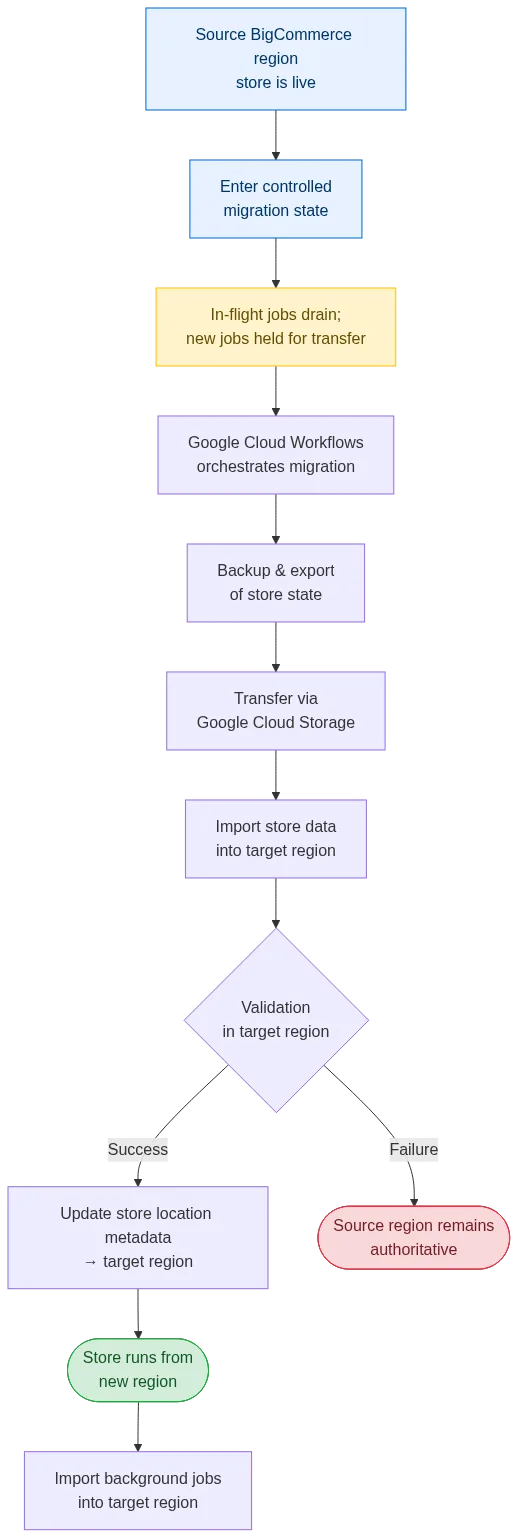
To coordinate all of that consistently, the process is orchestrated using Google Cloud Workflows. Workflows act as the control plane, sequencing each phase — backup, export, transfer, import, validation, and cutover — and ensuring each phase only starts once the previous one has succeeded. Google Cloud Storage is used as the intermediate transfer layer between regions, so exported data lands in a durable, region-aware location before being imported into the target region.
The controlled migration window
When a production migration starts, the store is placed into a controlled migration state for the duration of the move. This lets writes and background processing be safely handled across the regions.
That window is a deliberate tradeoff. A fully live, zero-downtime migration sounds attractive, but for a platform with significant asynchronous work — webhooks, indexers, notifications, deferred jobs — attempting it risks splitting in-flight jobs across two regions, where some run against pre-migration data and some against post-migration data. That class of inconsistency is hard to detect and harder to undo. A short, planned migration window is the safer engineering choice: it gives in-flight and background jobs a defined point to drain or be captured, and it keeps state authoritative in one region at a time.
Background jobs are not lost during the move. Jobs already in flight drain in the source region, while new jobs generated during the controlled state are held and exported to Google Cloud Storage with the rest of the store data. They are imported into the target region only after the store's location metadata has been updated and the store is running from there, so jobs can never run in the target region while traffic still routes to the source. If the migration fails before that point, the source region still has the jobs and continues as if the migration had never started.
Validation before cutover
Validation is automated and runs against the migrated data in the target region before cutover happens. It exercises the store end-to-end — data shape, service health, expected responses — and gates cutover on a clean pass. In practise, manual validation is rarely necessary; the automated checks are the source of truth.
Staged cutover and rollback boundary
Cutover uses staged location updates. A store is not considered "moved" simply because its data has been copied. The store's location metadata — the routing information that tells BigCommerce where the store actually lives — is updated only after import and validation have both succeeded in the target region.
This creates a clear rollback boundary. Up until that metadata update, the source region remains the system of record, and the migration can be abandoned cleanly with no merchant-visible impact. After the update, the target region becomes authoritative and any captured background work is replayed there.
Importantly, none of this changes anything externally facing. Public endpoints, URLs, APIs, and existing edge and CDN configurations continue to work exactly as before. Only internal routing changes.
Designed for the long run: data portability as definition of done
Migration tooling has a maintenance cost that's easy to underestimate. A migration service isn't something you write once and forget — it has to keep working as the platform around it evolves. Every new service that stores merchant data is a potential new thing the migration has to know about, and if portability isn't baked in early, the cost of catching up later compounds.
To keep migration sustainable, data portability is treated as part of the definition of done across the platform. New services that store merchant data are expected to store it in a way that can be cleanly isolated and moved per store, rather than entangled with the rest of the system. Building that discipline upfront removes a whole category of "the migration didn't know about this" problems, and it's a big part of why the migration system continues to work reliably as the platform grows.
Already handled for most stores.
Several years ago, stores were commonly provisioned in the US. Today, new stores are set up in the appropriate region from the start.
Migration still comes up in some cases, but in many situations, this is already aligned.
For example, a business might have originally launched with most of its customers in one region, then expanded into another. Over time, their primary customer base shifts, and the backend is no longer close to where most traffic is coming from.
It also comes up when a store was initially set up in the wrong region, which can happen. In those cases, moving the store instance helps bring performance back in line with where customers actually are.
The final word
For most businesses, this isn’t something you need to think about often.
But if your customers are in a different region from where your backend is running, it can have a real impact on how your storefront feels.
That’s why we built the platform to support regional infrastructure in the first place, and why the migration tooling exists. It gives us a way to make sure store instances are running in the right place when it matters.
Most of the time, that’s already taken care of when a store is set up. And when it’s not, we can move it without changing how anything works.
From your perspective, the goal is pretty simple: your storefront stays the same, and the infrastructure behind it is where it needs to be to support your customers.
FAQs
What is ecommerce latency and why does it matter?
Ecommerce latency is the time it takes for data to travel between a user’s browser and the backend systems powering a store. Higher latency makes pages feel slower and interactions less responsive, which can affect how easily customers browse and complete purchases.
What is Time to First Byte (TTFB)?
Time to First Byte (TTFB) measures how long it takes for a server to send the first piece of data back after a request is made. It’s influenced by both network distance and server performance, and it’s often used as a baseline indicator of site speed.
How does backend location affect frontend performance?
Even though customers interact with the storefront, most actions depend on backend responses. If the backend is far from the user, each request takes longer, which slows down page loads, product interactions, and overall responsiveness.
Does hosting location impact SEO?
Yes, indirectly. Search engines consider page speed as a ranking factor. If infrastructure location causes slower load times for users in a region, it can affect both rankings and user engagement metrics.

Get a free 15-day trial of BigCommerce.
No credit cards. No commitment. Explore at your own pace.