


- Launch Services
Overview
Chart your path to success with specialised services.Implementation Project Management
Experts to ensure you launch on time and under budget.Solution Architecture
Seasoned advisors to help you best design your store.Data Migration & Optimisation
Expertise on a clean and clear path to migrating your data.Enterprise Launch Package
Personal training on how to set up and launch your BigCommerce Store.

Professional Services Blog Series
Get to know our teams and how they support your success in this Q&A series.

The Global B2B Buyer Behavior Report
This in-depth report provides actionable strategies to help you sell more online.
BigCommerce Stripe Update: How to Upgrade your Legacy Stripe Integration to Stripe OCS
Create your store and start selling today.
Create your new website.
See if the BigCommerce platform is a good fit for your business.
No credit card required.

Written by
Aleksandr Topchienko07/05/2026
BigCommerce Stripe Update: How to Upgrade your Legacy Stripe Integration to Stripe OCS
Get The Print Version
Tired of scrolling? Download a PDF version for easier offline reading and sharing with coworkers.
A link to download the PDF will arrive in your inbox shortly.
Key highlights
BigCommerce recently launched Stripe OCS, the newest version of its Stripe integration.
Legacy Stripe integrations (V1 and V3) will no longer receive new features or ongoing maintenance.
Upgrade to Stripe OCS by July 14, 2026 to continue delivering a best-in-class checkout experience.
Stores that are not upgraded by the deadline may be automatically migrated to Stripe OCS within 60 days.
Contact BigCommerce Support if you need help reviewing your payment setup before upgrading.
BigCommerce is committed to helping brands deliver fast, flexible, and conversion-focused checkout experiences. With the launch of Stripe OCS, our newest Stripe integration, brands can take advantage of more payment options, simplify payment method management, and improve checkout performance.
If your store currently uses a legacy Stripe integration (V1 or V3), you’ll need to take action by July 14, 2026 to continue receiving updates and support.
What’s changing
BigCommerce is sunsetting support for legacy Stripe integrations (V1 and V3). These versions will no longer receive new features or ongoing maintenance.
To continue using Stripe with full support and access to the latest capabilities, you’ll need to upgrade to Stripe OCS.
If your store is not upgraded by July 14, 2026, it may be automatically migrated to Stripe OCS in the 60 days following the deadline.
What you need to do
If your store uses Stripe V1 or Stripe V3, upgrade your Stripe integration to Stripe OCS before July 14, 2026.
To check your current Stripe version:
Log in to your BigCommerce Control Panel.
Go to Settings > Payments > Stripe.
If you see the below banner, your store is configured with legacy integration:
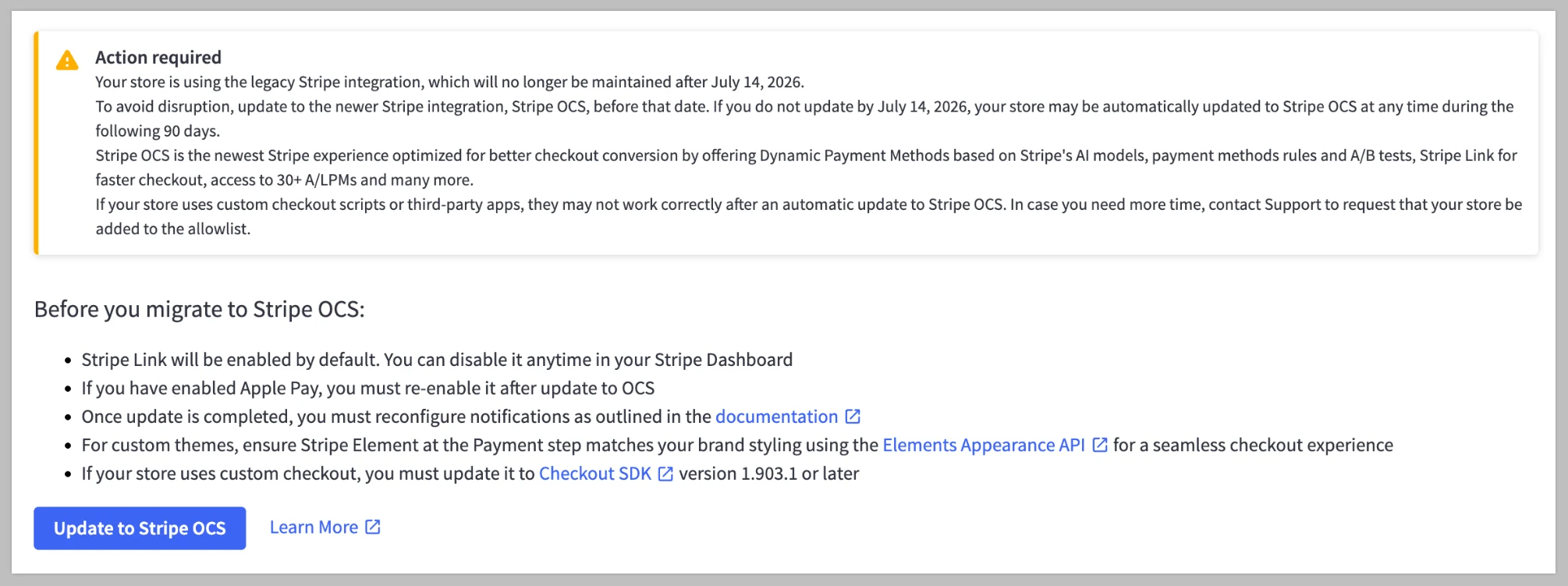
To start the update, click Update to Stripe OCS on the banner. If Stripe is configured for multiple currencies, update the integration for each currency.
Before you upgrade
Before upgrading to Stripe OCS, review your current setup and test the update process to avoid disruptions.
Test in a sandbox (if available): Validate the upgrade process before applying changes to your production store.
Reconfigure Apple Pay: If your store currently uses Apple Pay, you’ll need to set it up again in the Control Panel after upgrading.
Update webhooks: Reconfigure any Stripe notifications (webhooks) after the upgrade.
Review payment methods: In your Stripe Dashboard, enable only the payment methods relevant to your customers.
Check customisations: Review any third-party apps or Script Manager scripts that affect checkout as they may not function as expected after the upgrade.
Get support if needed: If your store relies on custom checkout scripts or apps, contact BigCommerce Support to review your configuration before upgrading.
What you gain with Stripe OCS
Stripe OCS brings the latest Stripe capabilities to BigCommerce, helping you reduce checkout friction, expand payment options, and improve conversion.
With Stripe OCS, you can:
Offer 30+ alternative and local payment methods, including Klarna, Affirm, and Afterpay.
Manage and configure payment methods directly from within your Stripe Dashboard.
Enable Stripe Link so shoppers can auto-fill payment details and checkout faster.
Use Dynamic Payment Methods to show shoppers the most relevant payment options and improve conversion.
A/B test different payment methods to tailor the experience to your customers.
Create custom rules to enhance payment experiences for your audience.
Stripe Link works for both guest and logged-in shoppers. In addition to auto-fill, it offers express checkout on cart and checkout pages to further speed up checkout.
Rollout timeline
To ensure full control of your migration timing, update your store to Stripe OCS before the July 14, 2026 deadline.
Stores that are not upgraded by this date risk being automatically migrated to Stripe OCS over the following 60 days.
If you need more time or prefer to stay on your current setup, contact BigCommerce Support before July 14, 2026.
Visit the Stripe product page to learn more about how Stripe enables BigCommerce customers to offer more payment options and improve conversion or download the app.

Discover How to Master Personalisation in the Age of AI
Users expect personalised and user-friendly websites more than ever. Learn how you can give them the experience they want.