







Written by
John Shieldsmith05/11/2026
Key Highlights
Conversational search lets shoppers describe what they need in plain language and refine the results across turns, working from the meaning and intent of the request rather than the exact words in it.
Keyword search matches words, semantic search matches meaning, and most production ecommerce search engines combine keyword and semantic retrieval as hybrid search, with conversational search as the interaction layer on top.
Shoppers now arrive from AI assistants typing full sentences, and according to Nosto’s 2026 survey, 40% say they’re likely to turn to ChatGPT or Claude after a store’s search returns irrelevant results.
For merchandisers, the work shifts from maintaining synonym lists to filling attribute gaps, dating every boost and pin rule, and treating zero-results reports as demand intelligence.
On BigCommerce, conversational search is rolling out in phases and is available to eligible stores, while Search & Navigation apps cover multi-language, B2B, and advanced searchandising needs.
How conversational search for ecommerce is changing the product journey
There was a time when your online product search began with a simple Google query, like, “best budget hiking boots.” Then came long-tail keywords, then voice search. Now, shoppers are increasingly typing full sentences into storefront search bars, engaging in conversational search.
In a nutshell, conversational search is a way of searching that lets shoppers describe what they need in plain language, then refine the results by adding or changing details. Unlike keyword search, it works from the meaning and intent of the request rather than the exact words in it. On an ecommerce storefront, it turns “waterproof hiking boots under $150 for wide feet” into filtered, relevant results in one step.
But, this is only scratching the surface. Let’s take a closer look at conversational search, where semantic search fits in, and how you can make the most of this growing search style.
What is conversational search in ecommerce?
Conversational search in ecommerce might sound strange to the uninitiated: a shopper having a back-and-forth with an AI agent or search engine. But, in reality, it functions much like a conversation with a store associate. The shopper describes what they’re looking for, in full, and the associate, or agent, replies.
Now, what’s this look like on a more granular level?
Conversational search, defined.
Conversational search is a way of finding products in which a shopper describes a need in natural language and refines the results across several turns. The system extracts constraints such as category, attribute, and price, returns matching products, and keeps those constraints as the shopper adds details.
All of this makes it possible for shoppers to receive recommendations based on their request as a whole, rather than a fragment.
For example, if a shopper says they’re looking for a “blue jacket under $120,” the system will limit results based on price and category, applying modifiers to surface blue jackets under the price threshold.
Semantic search, defined.
Semantic search uses natural language processing (NLP) to match the meaning of a person’s query to existing data. So, semantic search for ecommerce is taking a shopper’s query and matching it with your product data, then converting both into a numerical representation of the meaning. From there, it finds the closest matches.
All of this is powered by two signals: meaning (what the words refer to), and intent (what the shopper is trying to do).
With these two signals, a search for “a warm jacket for hiking” can return product recommendations for insulated jackets, even if “warm” isn’t mentioned on the product page.
How the two relate.
In the simplest terms, semantic search is the retrieval layer, while conversational search is the interaction layer.
On a workflow level, this looks like:
Shopper makes a query
Conversational search reads the whole request and extracts the constraints
Semantic search decides which products fit the request
Conversational search surfaces the results and handles any back-and-forth
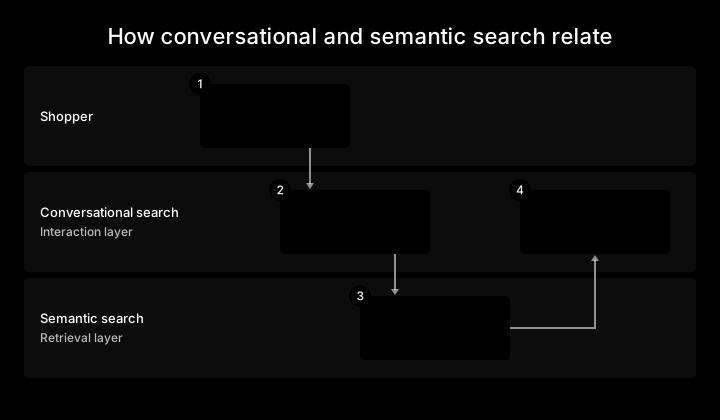
Think of semantic search as the stockroom finding what fits, and conversational search as the associate who listens, asks a follow-up question, and brings back options.
Both are ecommerce AI applied to retrieval rather than content generation, and most production ecommerce search engines combine keyword and semantic retrieval.
What conversational search is not.
Conversational search isn’t a chatbot, voice search, or conversational commerce, although it overlaps with each in different ways:
A chatbot: An assistant that may or may not search your catalogue. Conversational search always searches the catalogue and doesn’t need a chat window, unlike an AI chatbot or basic chatbot.
Voice search: Spoken input and another way to enter a query, but not necessarily an actual dialogue.
Conversational commerce: Selling through messaging channels, such as chat apps and SMS. Conversational search happens on your own storefront but plays a role in overall conversational commerce.
An AI shopping assistant: Guides the shopper through a decision, while conversational search answers the shopper’s query.
Keyword vs semantic vs conversational search: what’s the difference?
It’s easy to mix up semantic search vs. conversational search, especially given the latter is powered by the former. But, there are differences worth noting across the two.
Keyword search | Semantic search | Hybrid search | Conversational search
| |
|---|---|---|---|---|
How it matches a query | Matches query words to product words | Matches meaning via numerical representations of query and products | Runs both, then fuses the rankings | Extracts constraints from a sentence, retrieves (usually hybrid), and carries them across turns |
Synonyms, typos, and intent | Needs synonym lists and spelling rules | Handles synonyms and paraphrase natively | Semantic coverage plus keyword precision | Infers intent from the whole request and earlier turns |
Filters and attributes | Facets applied to matched results | Needs structured attributes alongside it to filter | Filters and boosts apply across both | Turns stated constraints (“under $120”) into filters |
Latency and cost | Fastest and cheapest | More compute per query | Two retrievals plus fusion | Highest: a language model call plus retrieval |
Catalogue data requirements | Clean titles, descriptions, and synonym lists | Descriptive product text | Both | Structured attributes for every constraint a shopper might state |
Typical failure mode | Vocabulary mismatch (“couch” vs “sofa”) returns nothing | Near-misses for exact codes and SKUs | Poor tuning buries an exact match under semantic neighbours | Invents products or loses context across turns |
What the shopper sees | Results for the words typed | Results for what they meant | Results that combine both | Results plus the option to refine or answer a question |
Where each approach wins.
Each approach has its strengths, even though the four work best together:
Keyword search: Wins for SKUs, model numbers, and exact product names
Semantic search: Wins when shoppers use their own vocabulary or describe a problem instead of a product
Hybrid search: Wins in most real catalogues, because it keeps exact matching and adds meaning
Conversational search: Wins when a request has several constraints or needs refinement, such as a gift search
Hybrid retrieval (keyword plus semantic search) with conversational search on top is the strongest setup for most catalogues. But, if you have limited technical resources, the above can help you make the most informed decision for your current catalogue and use cases.
Where each approach fails.
Given each approach has their own strengths, it’s only natural they can each fail in a different area.
Keep the following in mind as you consider the type of search you want to focus on:
Keyword search: Fails on vocabulary mismatch. The shopper types “couch,” your catalogue says “sofa,” and they get an empty page unless someone added the synonym.
Semantic search: Fails in the other direction. A shopper who types an exact SKU and gets “similar” products has a broken search.
Conversational search: Fails when it invents products or forgets a constraint from two turns ago.
Why most storefronts run hybrid search underneath.
It’s rare that you can have the best of every world. Hybrid search is one of those rare instances, making it possible for:
A keyword index and semantic index to run in parallel
Results that get combined into one ranking
Filters and facets, along with merchandising rules, that apply across both
Conversational search as the top layer
The end result is the user-friendly experience of conversational search, with keyword matching at the foundation, allowing you to surface products based on both exact-match data and meaning-based semantic interpretations.
How conversational search works on an ecommerce storefront
How does the metaphorical back-office worker find what a shopper is looking for and surface it to the front-end assistant? It’s not magic, rather, conversational search works in an ecommerce storefront via five steps.
To contextualise this, let’s imagine the shopper searched, “waterproof hiking boots under $150 for wide feet.” (Because feet of all sizes deserve to stay dry.)
1. Query understanding.
The system reads the whole sentence and extracts the constraints:
Category: Hiking boots
Attributes: Waterproof, wide fit
Price: Under $150
Use case: Hiking
Then, it works out whether this is a product search, a question, or a refinement of an earlier query.
2. Retrieval against product data.
Next, the system converts the query and each product into a numerical representation of meaning and finds the closest matches, usually alongside a keyword match. From there, it applies the extracted constraints as filters.
If “waterproof” exists only in marketing copy, meaning-based retrieval can still find it, but the price and width filters only work if those values are stored as attributes in your product catalogue.
3. Ranking and merchandising rules.
Your boost, bury, pin, and synonym rules still apply, as a layer on top of semantic retrieval. Synonyms mainly serve the keyword side of a hybrid system, while boosts, buries, and pins reorder what retrieval returns:
Boost: A multiplier of the relevance score for a particular product
Bury: A negative multiplier that prevents something from showing up as easily
Pin: Forces an item to the top position regardless of criteria
Synonym: Different words that can all map to the same semantic grouping
Campaign promotions and category merchandising rules apply the same way.
4. Refinement and clarifying questions.
The beauty of conversational ecommerce site search is the back-and-forth that takes place. If the shopper responds with further questions, the system needs to discern whether it’s a further constraint being added, or a new intent entirely.
For example, “in navy” adds a colour to the current hiking boot hunt. “Actually, show me trail runners,” replaces the category but keeps the budget and the fit intact.
5. Grounding: answers come from the catalogue, never invented.
It’s critical that conversational search only surfaces products, prices, and stock that’s currently existing in your catalogue.
To ensure this is the case, proper feed management plays a big role. This means having structured product data with accurate attributes, optimised metadata, and a human-in-the-loop auditing process to check whether the right results are being surfaced.
Why conversational search matters now
AI-referred shoppers arrive with a sentence, not a keyword.
Many shoppers show up on your site with a sentence, which they fed to an AI assistant, rather than a keyword shoved into Google. In fact, Adobe reports that AI-sourced traffic to US retail sites grew 393% YoY from January through March 2026.
These same shoppers can have a similar conversational-based experience upon arriving on your site, but only if you have the right conversational search in place.
Poor search sends shoppers to ChatGPT, not just to Amazon.
It’s important to get your conversational site search experience in a good spot, as a Nosto survey found that 59% of consumers say they often leave a store because onsite search is poor. And, 40% say they’re likely to turn to ChatGPT or Claude if they get irrelevant results.
While these platforms aren’t competitors, they’re free to send those shoppers to competing retailers if the results are a better match.
Zero-results and long-tail queries: examples
Keyword-only search engines often fail in two ways: a zero-results page when the shopper’s words don’t match the catalogue, and mismatched results for long-tail queries with several constraints.
Semantic search prevents zero-results searches caused by vocabulary mismatch, while conversational search handles long requests with several constraints.
To get a better idea of what this looks like in action, let’s look at a series of illustrative examples not pulled from any specific store’s data.
Zero-results failures semantic search fixes.
For each line, the first item is what the shopper typed, followed by what the catalogue says, and then what semantic search does:
“sneakers” → catalogue says “athletic shoes” → matches on meaning and returns the shoes
“couch” → catalogue says “sofa” → treats them as the same thing without a synonym entry
“wide pant” → catalogue says “trousers, relaxed fit” → returns the trousers
“something to wear in summer” → catalogue has shorts and linen shirts → maps the request to seasonal attributes
“Adirondak” or “niacinimide” → catalogue spells them correctly → returns the right products despite the typo
From typos to something as innocent as a mismatched term, semantic search can make zero-result queries far less common.
Long-tail natural language queries.
Long-tail search queries carry several constraints at once, and each one has to map to something your catalogue stores:
“running shoes under $100 for flat feet” → category, price, and a support attribute such as stability or arch support
“waterproof hiking boots under $150 for wide feet” → category, price, a material attribute, and a width attribute
“gift for a coffee drinker who already has a grinder” → an inferred category (coffee accessories) with grinders excluded
If your products don’t carry those attributes, semantic search can still find likely matches, but conversational search can’t filter on them.
Multi-turn refinement.
Now, let’s envision what a four-turn session, or back-and-forth, does for the constraints across the shopper’s search journey:
“show me running shoes,” sets the category
“only in blue,” adds a colour constraint
“under $120,” adds a price constraint
“actually, trail shoes,” replaces the category and keeps “blue” and “under $120”
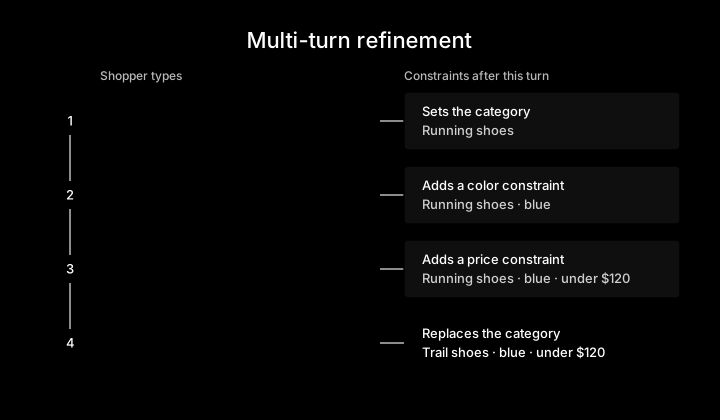
The first three turns build a set of constraints, while the fourth replaces one. A system that treats every turn as a new search would lose the colour and the budget on turn four.
B2B: part numbers, specs, and compatibility.
The B2B buying process is historically complex, with buyers needing keyword precision and spec filtering in the same search box.
This is another place conversational search can step in, looking like:
“6203-2RS bearing” → must return that exact part, not similar bearings
“which of these fit a 17mm shaft?” → a spec attribute (bore diameter) applied to the current results
“in stock at the Dallas warehouse” → an inventory-aware filter by location
This isn’t a hypothetical either, as Algolia’s 2026 report found that 71% of B2B businesses are already using AI in their ecommerce operations, and 83% are more likely to choose a search solution that includes AI.
Native BigCommerce search doesn’t currently search custom fields or manufacturer part numbers (MPN). The native search section below covers when an app fills that gap.
What changes for merchandisers when search understands meaning
Shoppers aren’t the only ones who benefit from a semantic, conversational search experience. When you have a meaning-based search engine in place, your merchandisers can do more, too.
In order for your merchandisers to get the most out of conversational search, follow this checklist as closely as possible.
1. Product attributes become the primary lever.
Audit the attributes behind your top conversational queries and fill the gaps first.
For instance, if “waterproof” lives only in marketing copy and not in a structured attribute, semantic search can find the product but conversational search can’t filter on it.
Start with material, fit, size, colour, use case, compatibility, and price, then add whatever your zero-results report keeps asking for. All of these pieces are part of catalogue management, so they’ll help you elsewhere, too.
This is a big job, especially if you have a large catalogue. Feed management tools such as Feedonomics, a Commerce company, can help enrich attributes at scale, with your team reviewing changes before they go live.
2. Synonym lists shrink but don’t disappear.
Keep synonyms and redirects for brand vocabulary and exact-match precision, and stop maintaining them for every plural, typo, and colloquialism.
Meaning-based matching handles “couch” and “sofa” on its own. But, it won’t know that your house name for a fabric means “water-resistant canvas,” so that one should stay a synonym.
3. Boost, bury, and pin rules move to a layer on top.
Give every manual rule an expiry date and an inventory threshold.
Boosts, buries, pins, campaign promotions, and category merchandising should continue to apply on top of semantic retrieval, but make sure they’re still relevant. For instance, if you had something pinned as part of a winter campaign, it shouldn’t be in place once spring rolls around.
4. Zero-results reports become demand intelligence.
Review zero-results and low-click queries weekly, and group each failure by cause:
Vocabulary gap: Add an attribute or a synonym that closes this gap
Product you don’t carry: An assortment signal for buying and planning future products
Incomplete data: Something to catch with product data enrichment
If you notice a zero-result issue that stems from a conversational query with too many constraints, relax the least important constraint and run a test. The last thing you want is an empty page.
5. Guardrails: rules with expiry dates, and answers grounded in the catalogue.
Configure brand voice and content guardrails. Conversational answers must never invent products, prices, or stock. Decide in advance what the system says when it has no good match and when it should ask a clarifying question rather than guess.
This is also a good place to practise general AI brand control and governance.
6. New metrics to watch.
Go into your preferred analytics platform, and add four metrics to track alongside the ones already on your radar:
Refinement-turn rate: How often shoppers refine rather than start over
Constraint-relaxation rate: How often the system dropped a constraint to show results
AI-referred conversion: Conversion rate for sessions that arrive from an AI assistant
Searches with zero clicks: Results shown, nothing clicked, usually signalling a relevance problem
Don’t stop tracking general metrics — AI attribution share and image-based searches — and keep A/B testing relevance changes one at a time to see how things improve.
Conversational search best practices
1. Never end on an empty results page.
In the world of site search, an empty results page is the worst. Imagine rounding the corner in a store and finding an empty shelf. It leaves a poor impression and you’re unlikely to go back.
Prevent this by configuring a fallback for no-results instances:
Surfacing related products from your recommendation engine
Pulling bestsellers in the nearest category
Running the same query with another constraint relaxed
Whichever route you go, make it clear to the shopper that the query was adjusted, “No results for wide pant, showing trousers,” and so on.
2. Design for mobile-first sentence queries.
It’s safe to proceed as if many of your queries will be on mobile, so design with that in mind.
Assume the query will be long, typed with thumbs, and possibly spoken. Mobile shoppers make more typos and are more likely to dictate a request, so typo tolerance and sentence handling matter most here. A photo or a voice request is a query like any other, so accept multimodal input where you can.
3. Make conversation optional, not required.
Show results first, then let people refine further. Don’t put shoppers through a series of questions before showing anything.
Conversation should be one route to the product, alongside typing a SKU, browsing a category, or applying a filter.
A clarifying question helps when a request is ambiguous, but it can quickly become friction when the shopper already knew what they wanted.
Conversational search on BigCommerce: what’s native and what’s next
Conversational search is rolling out in phases and is available to eligible BigCommerce stores, and native storefront search already covers catalogue, product, page, and brand search with filtering.
Let’s get a closer look at what this looks like, and what it means for you.
What native storefront search includes.
Native BigCommerce storefront search covers catalogue, product, page, and brand search — with AND, OR, and NOT operators — and product filtering/faceted search on eligible plans.
It doesn’t currently search custom fields or manufacturer part numbers (MPN), which matters for B2B catalogues. That being said, there are a number of approved BigCommerce apps from third parties that can make this possible.
Native conversational search: phased rollout to eligible stores.
Commerce announced conversational search and AI-assisted shopping experiences on the merchant’s own storefront at Commerce Live 2026.
Conversational search on BigCommerce lets shoppers search using natural questions instead of exact keywords.
Semantic understanding connects their intent with the most relevant products in the catalogue. Powered by models that understand the meaning behind a query, it’s much more than a keyword match. It’s rolling out in phases and is available to eligible BigCommerce stores.
The aim is to support higher-intent traffic by helping shoppers discover and buy from you more naturally.
What the baseline means for merchandisers.
BigCommerce offers native search functionality that effectively covers the baseline:
Typo tolerance
Meaning-based matching
Natural language queries for eligible stores
Meanwhile, there are numerous apps that can cover everything else:
Multi-language semantic dictionaries
Deep B2B spec and part-number search
Advanced searchandising suites
For merchandisers, this allows for less time wasted on synonym and redirect maintenance, and more time for attribute coverage and zero-results reviews.
When native search isn’t enough: search apps on BigCommerce
It’s possible you require a functionality right out of the gate that necessitates an app. It’s also possible you’ve outgrown the baseline. In either event, there are numerous apps on BigCommerce that can help.
Signals you’ve outgrown the baseline.
Even a solid baseline can be outgrown. In this case, third-party apps are likely the key.
To determine if you’ve outgrown the baseline, consider if any of the following applies:
You sell in several markets and need local vocabulary and synonyms in each language.
Your B2B buyers search by part number, specification, or compatibility, and native search doesn’t cover custom fields or MPN.
Your catalogue is large enough that relevance tuning needs dedicated tooling.
You need advanced searchandising, A/B testing, and campaign scheduling as a dedicated workflow.
You want search, recommendations, and personalisation unified on one platform.
If you’re one of those in the enterprise space, you’ll want to dive even further and explore our full guide on enterprise ecommerce search.
The final word
Despite conversational search and semantic search having slightly different roles in the overall modern ecommerce search experience, neither replaces the fundamentals: clear product details, a fallback for every empty result, and rules that someone on your team still reviews.
Kickstart your modern search experience by prioritising three things this month:
Pull last month’s zero-results report and group every failure by cause: vocabulary gap, product you don’t carry, or incomplete data.
Audit the ten attributes your top conversational queries would need to filter on, and fill the gaps.
Check whether your store is eligible for native conversational search, and identify which advanced needs, if any, point to a search app.
When you’re ready to see how search fits into the rest of the storefront, take the BigCommerce product tour or start a free trial.
Conversational search FAQs
Conversational search is a way of finding products in which a shopper describes a need in natural language and refines the results across several turns. The system extracts constraints such as category, attribute, and price, returns matching products, and keeps those constraints as the shopper adds details.
Semantic search in ecommerce matches the meaning of a shopper's query to the meaning of your product data, rather than matching the literal words. It works from two signals, meaning and intent, so "couch" finds sofas and "something warm for camping" finds insulated sleeping bags without a synonym entry.
Keyword search matches the words a shopper typed to the words in your product data, so it's fast and precise for SKUs and exact names. Semantic search matches meaning, so it handles synonyms, paraphrase, and problem-based queries. Most storefronts run both together as hybrid search.
Semantic search is the retrieval layer: it decides which products match the meaning of a request. Conversational search is the interaction layer built on top: it understands full sentences, carries constraints across turns, and can ask a clarifying question.
Hybrid search runs keyword matching and semantic matching on the same query, then fuses the two rankings into one result set. Filters, boosts, and merchandising rules apply across both. It's the default for production ecommerce search in 2026 because it keeps exact-match precision while adding meaning-based recall.
No. A chatbot is an assistant that may or may not search your catalogue. Conversational search always searches the catalogue and can run inside a standard search bar with refinement chips. Ecommerce chatbots often use conversational search as one of their tools.
No. Conversational commerce is selling through messaging channels such as chat apps, SMS, and social messaging. Conversational search is on-site product search that understands natural language. A store can offer one without the other.
Most zero-results pages come from vocabulary mismatch: the shopper typed "sneakers" and the catalogue says "athletic shoes," or the query has a typo. Semantic search matches on meaning, so it returns the right products without a synonym list or spelling rule. Any that remain usually point to a gap in your assortment or data.
No. Semantic search reduces the synonyms you maintain, because plurals, typos, and common synonyms are handled on meaning. You still need synonyms for brand-specific vocabulary and exact-match precision. Boost, bury, and pin rules continue to apply on top of semantic retrieval, so give each one an expiry date.
Conversational search needs structured attributes for every constraint a shopper might state: size, colour, material, fit, use case, compatibility, price, and stock. It also needs clear titles and descriptions for meaning-based matching. An attribute that exists only in marketing copy can be found but not filtered on.
Conversational search is rolling out in phases and is available to eligible BigCommerce stores. Native search also includes product, page, and brand search with filtering, and the Search & Navigation apps cover advanced needs.

There's a lot to love ❤️
Watch a demo to see the BigCommerce platform in action.